One assistant for the whole household.
Morning. Tacos are on the calendar for six, the beans are on the grocery list, and Ava made a game she wants you to play.
Sprite is a family app with a personal assistant built in. It plans meals, keeps the calendar and lists, makes games your kids can play with you, keeps the budget, and asks a parent before it does what a kid asked for. Everyone in the house gets an account, and a parent controls the kids' accounts.
Free for the whole household. The iPhone app is on its way; until then it runs in Safari.


Sprite checks the calendar before it answers.
Features
Sprite is one app for the household's plans, games, documents and calls, with an assistant that can work in all of them. These screens come from the app as it runs today on a household's Sprite server.
An account you make today starts on Sprite's servers with chat and calls with Sprite, the calendar, notes, lists, the built-in games against Sprite, Friends, accounts for the whole family and kids' controls. Sprite making new games, docs, sheets, the budget, Watch, email, scheduled jobs and Sprite's work list run on a Sprite server, which the Server plans add. Those plans are coming soon.
Meals, calendar and lists
Ask in plain words. Sprite reads the family calendar, plans the week's dinners and adds what you need to the grocery list. When two plans land on the same evening, it says so and asks which one to keep.
- A shared calendar with agenda, chores and homework views.
- Grocery and to-do lists that everyone can add to.
- Chore reminders go to the person who owns the chore.
- Scheduled jobs, such as a news summary every morning at 7, on a Sprite server.
Kids' accounts
A parent sets up a kid's phone by scanning a QR code, and the kid signs in without a PIN. When a kid asks Sprite for something that needs a grown-up, such as a web search, the request goes to a parent's phone and Sprite waits for the answer.
- A parent decides what Sprite may do for each child.
- "Ask a parent" cards show the exact request before you say yes.
- Kids' chats follow the same safety rules whichever AI model answers, and a separate safety check reads each request first.
Games
Ask Sprite for a game and it builds one, then shares it with the people you pick. The game shows up in their Games tab with Play and Not now buttons. Chess, Connect Four, tic-tac-toe and a number race are built in, and you can play family members or a Sprite bot.
- Turn-based games between phones in the household.
- Each time a game is published, Sprite keeps that version.
- Games and pages run in a sandbox and can't see your account or your other data.
Docs, sheets and the budget
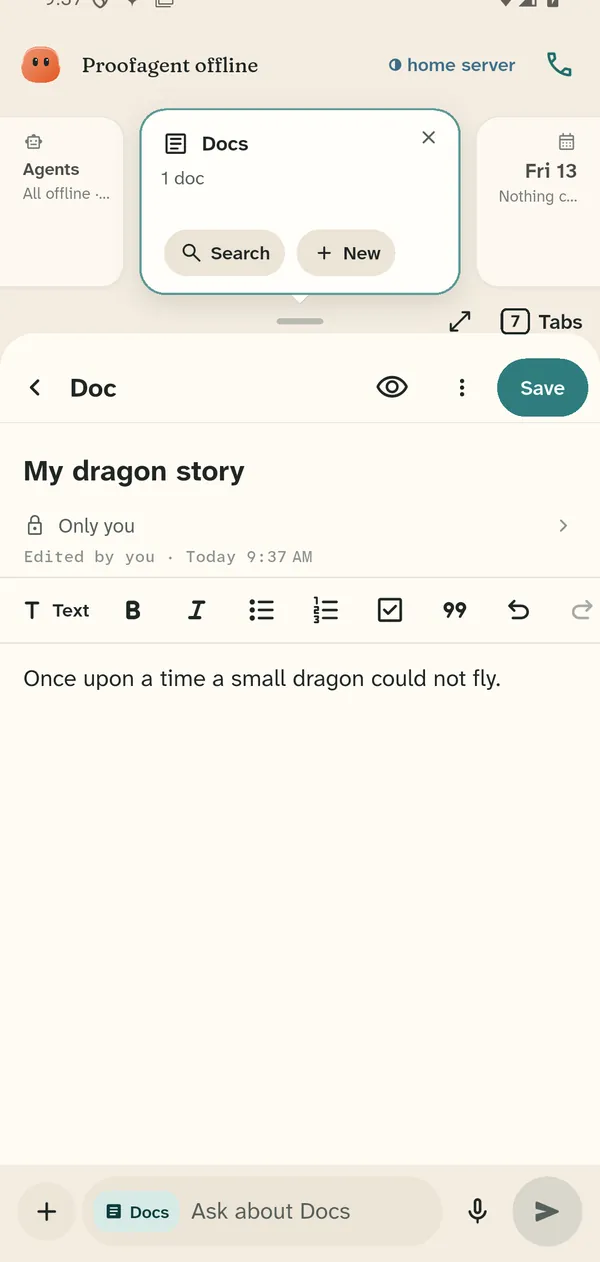
Write a doc, keep a sheet with totals, or track the household budget by month. Sprite can fill them in when you ask, and every file shows who can see it.
- Sheets with formulas and totals.
- A monthly budget with categories for the whole household.
- Keep a file to yourself, or send a copy to someone in the family.
Sprite's work list
Everything Sprite is working on sits in one list, marked running, queued, paused or done. Open one to see each step it took. Holding the red bar at the top stops all of it at once.
- Every answer has a "Show your work" receipt.
- Every answer says where it ran: on your phone, on a home server, or in the cloud.
- Work on your server waits until you hold Allow.


Calls
Call Sprite and talk out loud. Sprite hears you with a model on your phone. The first call downloads it on Wi-Fi, and on older phones Sprite answers after you finish each sentence.
More about callsWatch
Keep a watch list the whole household shares, and play your own movies and shows from your home server's library.
Needs a Sprite server
More about WatchConnect your own mailbox: Gmail, iCloud, Yahoo or any IMAP account. The password stays on your phone, and mail is kept in memory, never written to disk.
Needs a Sprite server
More about emailPrivacy and control
Sprite has no ads and no trackers. Your household's chats, files and games live on the server you choose, and every answer in the app says where it ran.
Small models can run on the phone itself. For answers marked on phone, the model ran on the device.
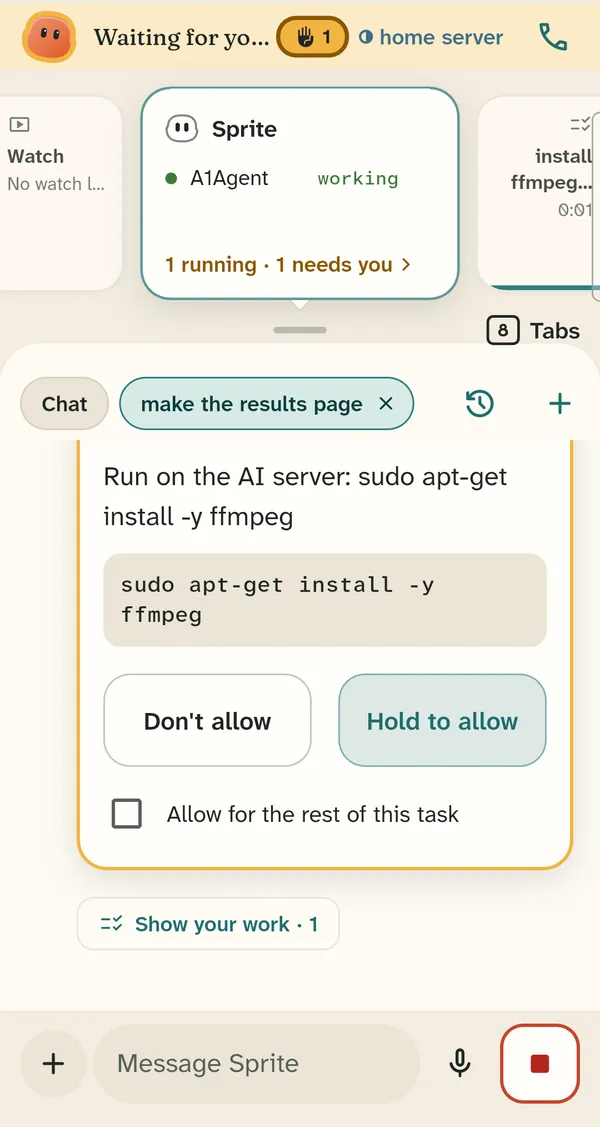
Approval before server commands
When the agent wants to run something on your server, you see the exact command and hold Allow. A quick tap does not approve it.
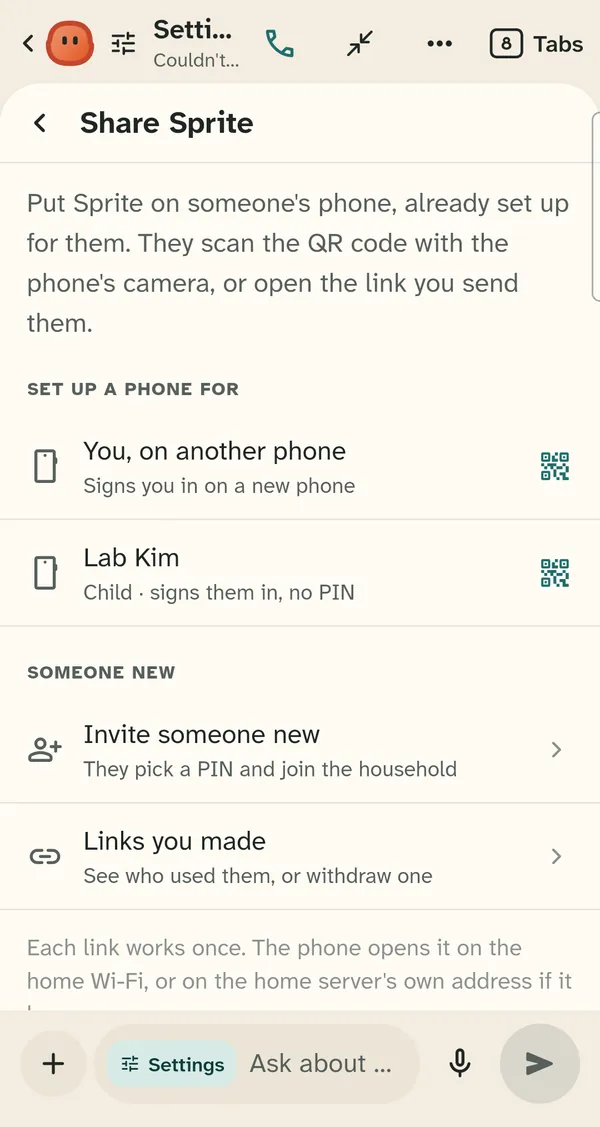
Household members only
Add family members with a QR code or a one-time link. Each link works once, and you can withdraw it before it is used.
No ads
Sprite shows no ads and sells no data. Paid plans pay for storage, servers and AI usage, and simple features such as notes, lists, the calendar and games are never behind a paywall.
Getting started
Setting up a household takes a few minutes, and nobody needs a server to begin.
- Get the app. Download it for Android, or sign up on the web from any phone or computer.
- Make your household. Tap Create an account and enter a name for the household, your name, a username and a password of at least 15 characters (a short phrase works). You are the household's admin.
- Add your family. In Settings, open Members and approvals, then Share Sprite, tap Add a child or Add an adult, and show the QR code to that person's phone or send them the link. Their phone signs in with no PIN or password, and you choose what Sprite may do for a child. After the setup link signs a phone in, close Sprite and open it again once.
Pricing
One price covers the whole household. Chat with Sprite, the calendar, notes, lists, the built-in games and kids' controls are free. The paid plans, all coming soon, run Sprite on your computer, a home server or any VPS, beside the agent you choose, and no Claude subscription is needed. If you want, Sprite also sets up a VPS with Claude Code for you.
Questions
Before you pay
Does Sprite sell our data or show ads?
No. Sprite shows no ads and sells no data, and the website and the app carry no third-party trackers. Paid plans pay for storage, servers and AI usage. The privacy notice lists everything we store.
Where does our family's data live?
On Free, on Sprite's servers. On the Server plans, on your household's own server. Each answer in the app says where it ran: on the phone, on a home server or in the cloud. On Free, Sprite answers from the cloud with providers that do not train on your messages, listed in the privacy notice. Email passwords stay on the phone they were typed into.
Is it safe for kids?
Kids get their own accounts, set up by a parent, who decides what Sprite may do for each child. Requests that need a grown-up wait for a parent's yes. Sexual content is always blocked, and if a child says they are hurt or unsafe, Sprite tells them to get help from a trusted adult and gives the emergency numbers. These rules are in every plan, and the kids' page has the details.
How do I cancel?
From your account, at any time. Your plan stays active until the end of the period you paid for, then the household moves to the Free plan. If Sprite rents your server, we keep it for 30 days so you can export your data.
Can I get a refund?
If something you paid for did not work and we could not fix it, tell us within 14 days of the charge through the contact page, and we refund it. The terms have the details.
Is Sprite really free?
Yes. The Free plan covers every member of the household, with no ads: chat with Sprite on 100 cloud assistant credits a month, calls with Sprite, the calendar, notes, lists, the built-in games against Sprite, Friends and kids' controls. The Server plans are coming soon: Sprite on your computer, a home server or any VPS, with the agent you choose.
Using Sprite
Which AI does Sprite use?
On Free, Sprite answers with a cloud model on Sprite's servers, from 100 assistant credits a month that renew on the 1st. When they run out, the assistant on your phone keeps working. On the Server plans, your household's own server runs the agent you choose. Hermes and Claude Code work today, and Codex is coming. If you pick Claude Code, Sprite can install it for you.
Do I need a Claude subscription?
No. Hermes works without one. Claude Code works with your own Claude plan (Pro or higher) or with an Anthropic API key, which Anthropic bills by use.
Can I install Sprite on my own computer?
Yes. On "Your own server", you install Sprite where your agent already runs: your own computer, a home server or any VPS. The installer runs on Ubuntu 24.04 with 4 GB of memory. If you would rather not run one, Sprite can set up a VPS with Claude Code for you, or rent and run the server on "Server, hosted by Sprite". The Server plans are coming soon.
What is the difference between the Server plans?
On "Your own server", Sprite runs on a computer you provide: your own computer, a home server, or a VPS you rent and pay the hosting company for. Install it where your agent already runs, or let Sprite set up a VPS for you. On "Server, hosted by Sprite", Sprite rents and runs the server for you. On both, you connect the agent you choose: Hermes and Claude Code work today, and Codex is coming. No Claude subscription is needed. If you use Claude Code, you sign in with your own Claude plan (Pro or higher) or use your own Anthropic API key, and Anthropic bills that use.
Which plans can build games and pages?
Every plan plays the built-in games: Connect Four, chess, tic-tac-toe and Race to 20, against Sprite or each other. Sprite building new games and pages, and publishing them, runs on a Sprite server, which the Server plans add. Those plans are coming soon.
Is there an iPhone app?
The iPhone app is in progress. Until it is in the App Store, iPhone users can use Sprite in Safari by signing up on the web.
How do I install the Android app?
Download the app from our download page and allow the install when Android asks. The Google Play listing is on its way, and the app updates itself in the meantime.